
Working offline in the App: what do the cloud, sync and tick symbols mean? [06-0110]

CertSuite uses 3 symbols to help you prepare your jobs so that you can work on them offline in the App: a cloud icon, an orange 'sync' icon, and a green tick.
You will see the three symbols next to your jobs in the Current Jobs list - and here is what they mean ...
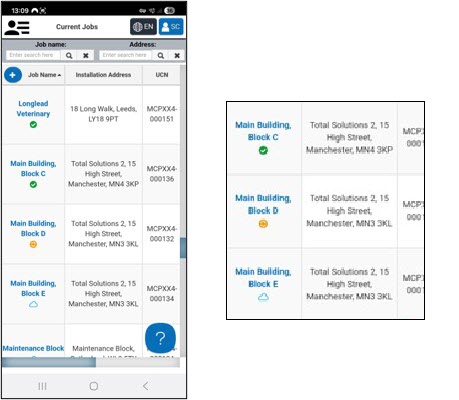
The Cloud symbol

What it means
The job is in the CertSuite Cloud, but it isn't accessible offline on your device
What to do next
Simply open the job on your device: it then syncs down from the Cloud on to your device and can be worked on offline: once the job has successfully synced it gets a green tick - you are good to go!
The Sync symbol

What it means
The job is on your device, and you can work on it, but it contains data that hasn't been synced up to the CertSuite Cloud yet, and it is best practice to sync it as soon as you can
What to do next
Open the job on your device: it then syncs up to the Cloud, where it is securely stored for you to work on any time, on any device: once synced it gets a green tick - you are good to go!
The Green Tick

What it means
The job is on your device and is fully synced to the CertSuite Cloud.
What to do next
Get to work! You are good to go!
Any questions or feedback, contact us at: software@megger.com
[Article 06-0110-01]